Showing posts with label surviving in a world of zombies. Show all posts

Tuesday, March 8, 2011

Surviving in a world of zombies - using ebook readers, PART 2

This is the fifth installment of my series "Surviving in a world of zombies" (for the previous parts, see here, here , here and here).   Today, I am going to discuss "ebook readers", again.  Indeed, in my initial post about ebook readers, I wrote the following:
One more thing: there are plenty of dedicated book readers out there, including Amazon's "Kindle", Barnes and Noble's "Nook" and others.  My advice is simple: STAY AWAY FROM THEM.

First, they are pricey.  Second, no matter how small or light they are, they are an extra device you have to carry with you.  Third, they are designed to be used with
DRMed contents.  Fourth, the companies making them keep the control of these device and what is on it, not you; in fact, Amazon even removed contents from their Kindle device. Fifth, the hardware on these devices is not always designed to act like a simple memory stick, and some will require you to install proprietary software on your computers, or even use proprietary cables.  Sixth, these devices are designed to have you pay for the books you read, which I find morally wrong as I encourage people to share (I don't believe that there is any such thing as "electronic piracy").
Actually,  I did some more research and I found out, to my great delight, that what is true about the Kindle or the Nook, is not quite true for all ebook readers.  There are some ebook readers out there which do not come with the limitations of the Kindle or Nook and which I can actually recommend.

If I had to recommend only one ebook reader, this would most definitely be the PocketBook 360.  This ereader has an excellent black and white E-ink 5" screen, and the following technical specs:
  • Display: 5-inch E-Ink, 600x800, 200 dpi, B&W
  • Touch Panel: None
  • Operating System: Linux
  • CPU: Samsung, S3C2440AL-40, 400 MHz, ARM9
  • Internal Memory: RAM 64 MB, Flash 512 MB, User-accessible 466 MB
  • External Memory Slot: microSDHC (up to 32 GB)
  • Wireless Connectivity: None
  • Wired Connectivity: miniUSB
  • Audio Output: None, thus audio files are not supported
  • Accelerometer: Yes
  • Battery: Li-Polymer, 1000 mAh
  • Size: 118 х 140 х 10 mm, or 118 х 140 х 12 mm with cover
  • Weight: 150 grams (5.3 oz)
  • Color: Black or Ivory
  • Wall Charger: Yes
The device in thin, yet very strongly built, with a metal frame around the hard plastic body and it comes with a hard cover which you can snap on the back while reading and on the front when you are done.  This is a pure ereader, that is to say that 'all' it does is display books.  But it does that extraordinarily well.  The application which it uses to display books is the best on I have ever seen, FBReader.  The device and software are highly configurable, the battery lasts forever, and the overall feeling is one of high quality.  The one thing that I want to stress here is that E-ink technology, while superb, does require an external source of light.  In other words, you cannot read this device in the dark.  However, you can read it in even the brightest of sunlights, which would not be the case with a TFT/LCD screen.

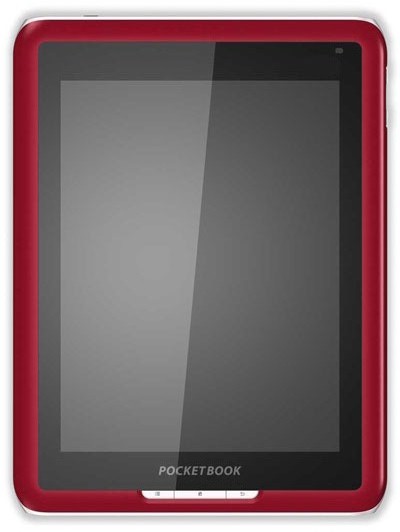
For somebody planning to do most of his/her readings indoors or in the dark, the ebook which I would recommend would be another model from the company PocketBook: the PocketBook IQ 701.

The PocketBook IQ 701 is radically different from the PB360.  First, while the PB IQ 701 is primarily an ebook reader, it is also an Android Tablet "light".  This means that it can do most - but not all - of what any Android-based device can do.  The PB IQ 701 has the following specs:

  • Display: 7-inch TFT LCD, 600x800, 143 dpi, Color
  • Touch Panel: Yes
  • Operating System: Android 2.0
  • CPU: Samsung S3C6410, 800 MHz, ARM11
  • Internal Memory: RAM 256 MB, Flash 2 GB
  • External Memory Slot: SDHC (up to 32 GB)
  • Wireless Connectivity: 802.11 b/g/n
  • Wired Connectivity: miniUSB 2.0
  • Audio Output: 3.5mm stereo TRS connector, 2 speakers
  • Accelerometer: Yes
  • Battery: Li-Polymer, 1600 mAh
  • Size: 144 x 192 x 14 mm
  • Weight: 516 grams (18.2 oz)
  • Color: Red, White, or Blue
  • Wall Charger: Yes; OUTPUT 12V, 1.5A
The PB IQ 701 is amazingly well built, very strong and elegant.  It has a very good touchscreen, decent speakers (though the listening experience is better with earphones) and a rather powerful CPU running it all.  I would recommend some small tweaks to improve the device.  First, the welcome menu is terribly ugly and I would recommend installing ADW-launcher, a superb and highly customizable home desktop and application launcher.  Second, while the PB IQ 701 comes with a pretty good ebook reader application, I would recommend installing FBReaderJ, an FBReader version for Android.  With those two tweaks, the PB IQ 701 becomes a wonderful ereader which can double as a decent Android Tablet.  I wrote "decent" for one reason: the PB IQ 701 runs Android 2.0 (which is an early version of Android) and it does not have all the capabilities (such as a phone, a GPS or a camera) which most Android-devices feature.  Unlike the PB 360, the PB IQ 701 has a backlight color touchscreen which is ideal in indoors conditions.  The battery life of this device is therefore much shorter - somewhere in the 4-7 hours range depending on how it is used.

Finally, for the cash-strapped person, the cheapest but still very decent ebook reader I found is the Ematic 7-inch TFT color ebook reader which currently sells on Amazon for only $78.99.  I will not review it here beyond saying that it a very decent deal for such a cheap price (you can read more about it here and here).

Coming back to my initial criticisms of ebook readers such as the Kindle or the Nook, none of the three ebookreaders I mention here lock you in to a vendor or force you to agree to DRM rules.  All of them can be connected to any computer (GNU/Linux, OSX or Windows) and recognized like any other storage device - hence the transfer of books does not require the installation of some crappy software.  Finally, they are reasonably cheap.

There is one topic connected to the topic of ebooks and ebook readers whose importance cannot be overstated: if you get an ebook reader you must, you absolutely must, get an application called 'calibre'.

Calibre is an amazing free software application which runs on GNU/Linux, OSX and Windows and which really is the "one stop solution for all your ebook needs" as the calibre website proclaims.

Calibre is is an extremely powerful ebook management system which combines a relational database capable of handling tens of thousands of books, with a uniquely powerful ebook format conversion capability which currently accepts the following input/output formats:
  • Input Formats: CBZ, CBR, CBC, CHM, EPUB, FB2, HTML, LIT, LRF, MOBI, ODT, PDF, PRC**, PDB, PML, RB, RTF, SNB, TCR, TXT
  • Output Formats: EPUB, FB2, OEB, LIT, LRF, MOBI, PDB, PML, RB, PDF, SNB, TCR, TXT
This is not only extremely useful for the user, it is a wonderful freedom-fostering capability which allows users the freedom to move their ebooks from any device to any device, from a computer to a cellphone, to a PDA or to a specialized ebook reader.  Such an ability to convert is a powerful weapon to fight corporate vendor lock-ins.

Calibre's features are too numerous to all be described in details here, but I can summarize them by saying that Calibre is also an ebook-reading software, a ebook emailer, an ebook server to access the books over any network and a library management application. 

Getting calibre and learning how to use it (which is not difficult) is an absolutely indispensable step to fully use potential of ebook readers.

One more thing.  I noticed that a high-quality font makes a huge difference in the reading experience on an ebook reader.  After looking around for a while and trying all sorts of fonts, I found one which I find superior to all the others: the Ubuntu font family.  You can read more about it here and here.  To install it to FBreader all you need to do is download it from here, unzip the downloaded package and copy all the files to the /fonts directory.  Then, just launch FBReader, go to "settings" and select the font type and size.

Ok, there are many many aspects of the ebook reader business which I have not addressed here, and some which I have only mentioned rapidly.  So if you have any comments, criticisms or comments - you know what to do: please post them here and I - and others - will gladly reply to them

The Saker

Wednesday, December 1, 2010

Surviving in a world of zombies - using ebook readers

Dear friends,

This is the fourth installment of my series "Surviving in a world of zombies" (for the previous parts, see here, here and here).   Today, I am going to discuss "ebook readers".

Over the past years several of you have commented that the speech transcripts of Hassan Nasrallah I post here are very long.  Well, compared to a typical article or blog post, they are indeed.  Compared to listening to one hour of TV, they are extremely short.  But yes, you have a point and not everybody can (or wants) to sit down and read speech on a website.  So here is my suggestion to you - use an ebook reader.  This is how:

Copy the entire speech into whatever text editor or word processor you like, and save it in the simple "text file" format.  Then copy it to your cellphone which might already have some halfway decent text reader already installed on it, or available for download from third-party distributors.

If not, I can highly recommend ZXReader, a wonderful piece of software which supports the following formats: TXT, FB2, RTF, and ZIP.  Check here for a good review of ZXReader.  ZXReader has been designed to work on Symbian-based cellphones.  The download page in English for ZXReader can be found here.

If you are the lucky owner of a Nokia Internet Table (N770, N800, N810 or N900) or some Motorola or Siemens smartphone, then you can simply install FBReader.  It is every bit as good as ZXReader which, I suspect, it inspired in the first place.

For Android-based phones, you can get FBReaderJ - a Java port of FBReader.

[Now, if you are the user of an iPad, iPod or iPhone or any other iThing you could probably download the iPayTooMuch iBook reader from the iTunes store and use the iCopyFiles application (now with its new super-cool interface "Mountain Cougar"!) to copy the text file to your device, but why would you want to read a Nasrallah speech anyway?!  Check out  the awesome Apple "i" instead.]

The big advantage of these book readers is that you can literally carry an entire library of books with you.  If you leave the application, it will remember where you stopped and reopen your text at the correct spot, even if you are reading many different books at the same time.  Also, the text, fb2 or zip file formats are very small, so you can carry a huge amount of texts with you even if your device has a modest storage capacity (I typically carry about 40 texts ranging from relatively short articles to Dostoevsky's major books in fb2 or  text format on my cellphone, all nicely fitting together in a little less than 25MB!) .

If you are on a very tight budget, like myself, and want to get a minimalist smartphone which can double as an ebook reader, get the Nokia 5230.  In the USA, there were deals at RadioShack for about 25 bucks with a T-Mobile contact.  Ok, the Nokia 5230 is most definitely not the best smartphone out there, and Symbian is dated, but its *cheap* and it does have a good screen on which reading with the ZXReader is a real pleasure (It also has a good sound quality and the best phone-based GPS on the market!).  You can also listen to streaming Internet radio (I mostly listen to KPFK in Los Angeles) or watch al-Jazeera, France24 or Press TV on these devices anywhere you are, which is nice when living in a society of zombies who are stuck to their TV sets spewing imperial propaganda.  Nokia has a basic but decent podcasting client too, so you can have your device download whatever show you like for you.

One more thing: there are plenty of dedicated book readers out there, including Amazon's "Kindle", Barnes and Noble's "Nook" and others.  My advice is simple: STAY AWAY FROM THEM.

First, they are pricey.  Second, no matter how small or light they are, they are an extra device you have to carry with you.  Third, they are designed to be used with DRMed contents.  Fourth, the companies making them keep the control of these device and what is on it, not you; in fact, Amazon even removed contents from their Kindle device. Fifth, the hardware on these devices is not always designed to act like a simple memory stick, and some will require you to install proprietary software on your computers, or even use proprietary cables.  Sixth, these devices are designed to have you pay for the books you read, which I find morally wrong as I encourage people to share (I don't believe that there is any such thing as "electronic piracy").

It is a much better choice to screw the "suits" and their corporate world and use the many websites which offer "ebooks" in various formats for free such as, for example, e-reading, in the Ukraine, or use any filesharing (The Pirate Bay, Demonoid, The Gutenberg Project, OneBigTorrent, Torrent411, RuTracker, etc.) or file hosting (Rapidshare, Megaupload, Fitbit, Mediafire. etc.) option out there.  There are many more options out there and just a little research will find you pretty much anything you want, including banned/censored books which no publisher is willing to print (such as the English text of Professor Ariel Toaff's "Blood Passover" - available here).

I really believe that electronic book readers are a fantastic resource and truly a crucial technology for surviving in a world of zombies.

The Saker